Posts

Top 3 Ways How to Create URL Shortner Website

Image
How to Create URL Shortner Website: URL abbreviates Unique Resource Locator. URL shortner means you can convert length form of url into shorter form of url. Also you can add specific name followed by the url using url shortner website. Previously we were using Google’s free url shortner for shortening the url, but currently google stopped that service. But still url shortner are available in the internet service but they do not give premium service at all. To get premium services such as custom URL structure, title modification, SSL enable for url etc. we need to pay money for them. To save money, in this tutorial we are going to see how to create URL shortner website. Also using this method, you can make money. How to create URL shortner Website: Step1: You can create url shortner website in three ways. ·          Using Wordpress plugin => Non profitable ·          Using External PHP sc...
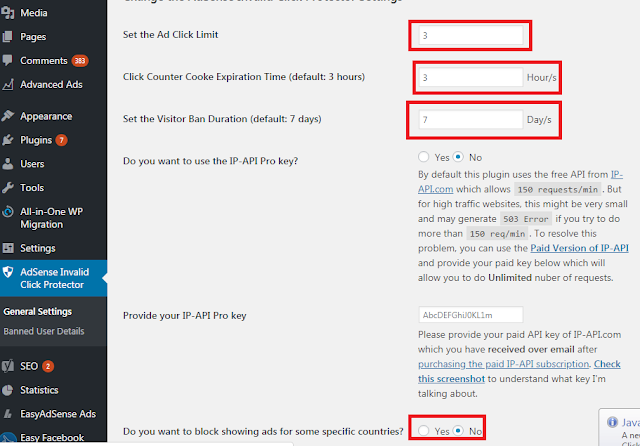
How to Install AICP Plugin On Your WordPress Website?

Image
How to Install AICP Plugin On Your WordPress Website? AICP plugin is no more than an invalid click protector adsense. It is used to protect publishers from intended ad clicks, targeting adsense ads, and to block their adsense account by publishers. In this article, however, we will see how to install the AICP wordpress plugin for your website. The main advantage of the AICP plugin is that you can block the IP for a specified period of time, track the IP location and block the country-based user. Announcements will not appear in the blocked countries. What is invalid clicks: Publishers clicking their own ads Too many ad clicks by a same user Publishers are encouraging ad clicks on their website. Publishers creates auto clicking system For these reasons, the Publishers account terminates adsense. You should follow the steps to activate the ACIP plugin to prevent this account termination. Step:1   Login to your WordPress website, now you see your dashboard Step:2...

How to Add Download Wait Counter On Blogger and WordPress

Image
How to Add Download Wait Counter On Blogger and WordPress: Download Wait Counter Protecting your Adsense account from invalid activity and increasing your search engine ranking is an important option. This JS code is used to protect the download link from instant clicks; i.e. usually the file sharing website offers the download file, which means that users will always find the link to download the file. This means that your user only spends 5 seconds on your website. You can’t get good google ranking, therefore. Take an example of how I run a youtube channel for reviewing applications, since I review everything in the video itself. In order to provide a download link My website means that the user only downloads the web files to my site. The user obviously doesn’t spend a lot of time on my site. Reduce the rank on my website due to this google. In this article we will see how to install You can also use this JavaScript and adjust the time counter to display the download lin...

Top 4 Ways to Add Related Post On Your WordPress Website

Image
Top 4 Ways to Add Related Post On Your WordPress Website: The related article is both the WordPress and blogger’s most important future. By adding related articles, you can increase the traffic on your website and improve your user experience. We will discuss how to add related posts to your WordPress website in this article. There are four ways you can add related posts to your wordpress website, so you don’t need to have any additional coding information. Let’s start… Side bar related article inline related article post under related article Google matched content apps  Sidebar related article: Before that, you should know how to add wordpress plugin to your wordpress website if you don’t know how to use and first read this link. Step1:  Now you go to plugin store and search recent post related article extended plugin or  download it from this link Step: 2  you see a plugin as shown in the figure, and click on install and activate it Step3: ...

Best Government Jobs Website For Freshers -2019

Image
Best Government Jobs Website For Freshers -2019: The government’s job is our dream. A day passing government jobs is a very difficult task in India. Government jobs are becoming very competitive and difficult due to the high population. India is suffering from bad political condition and corruption right now. Updates on government recruitment, however, improve the chance to get government jobs. In this world, we can prepare ourselves to survive. So we will study the top five best government jobs website according to their regular updates and activities in this article. The following websites update their content according to the original notification from the government, which is uploaded on the government website. Using our personal experience, you can go blindly to the website mentioned below. Sarkar result: Sarkariresult.com  is one of the best government job updates websites. They update government admission cards, results announced on a daily basis by the gov...

Difference Between Blogger and WordPress

Image
Difference Between Blogger and WordPress: Bloggers and wordpress are both the best blogging platform, but they both have advantages and disadvantages. We’ll see the difference between the blogger and WordPress in this article. Blogger.com Blogger  is Google’s free website to create fantastic content. It’s totally free for Google accounts. With their layout section, you can easily customize your website template. You don’t need to learn HTML and JavaScript by creating a website in a blogger, but already many videos are available in YouTube. You can then learn how to customize a blogger. You can also access your Google AdSense account directly to monetize your site. Google AdSense is Google’s own ad delivery network. You can apply for Google AdSense Google AdSense after you write 10 to 15 posts. Generally, they check your website whether or not your website compiles its program policy. Advantages blogger is free platform you can easily customize your website ...

8 Plugin To be installed After installing of WordPress website

8 Plugin To be installed After installing of WordPress website: WordPress is one of the best blogging platforms. The main benefits of WordPress are that many plugins are available in the wordpress plugin store. Plugin makes our website unique and faster, it also improves the quality of our website and improves our rating. In this article, we will discuss the top seven best plugin you need on your wordpress website. You’re a blogger? You should then keep with you. At the same time, it is not mandatory if you run an E-Commerce site. Yoast : It’s SEO plugin and it’s both free and premium versions available. Free version of Simple Blogs is enough. You can create a sitemap (available in premium version) for your website using this plugin. This plugin was used mainly to analyze the content. It provides detailed information on your content, including keyword strength, internal links, external links, images, alt tags, etc. It also suggests improving the areas. You can add custom meta t...